Friday, July 17, 2009

DIY: How to Replace Subaru Forester Spark Plugs

It has been 30K [km] and almost a year since my last spark plug change (That was first for me). So, today i bought four NGK Spark Plugs from one of (Official Service) Subaru Dealers in Ankara and replaced them.

For now this post is copied as is from Wikimechanist.
The upcoming posts that can be named as "mechanic" will be posted only to Wikimechanist.


1 - Remove air filter elements going to the air filter to get free space:


2 - Remove Spark plug cables:


3 - Remove Spark plugs with suitable socket. That is 16 mm.
Also you'll need torque wrench to tighten with proper torque. If you have not one. Turn spark plugs 1/2 to 1/4 turn after contact occurs.


The previous change was 30K [km] before. You can see the old and the new spark plugs. The clean one is new of course. It must have 1 - 1.1 mm gap. If not adjust it.


For the driver side plugs, you need to remove window washer water container.
But not fully removal is needed. You may fix it with some elastic holders after turning it a little. You may have enough space to handle replacement of spark plugs.


Update (02.01.2010) some pictures for driver side plug removal:


Good luck.
It is pretty easy. Just half an hour for me.

Labels: ,

Friday, July 10, 2009

Forester arka camındaki örümcek ağı

Labels:

Thursday, July 09, 2009

How to Change Rear Differential Oil of Subaru Forester

Step 1: Lift up vehicle a little bit. Since you'll need some free space to handle 24'' wrench to loosen the differential 1/2" plugs.


Step 2: Loosen the upper plug first. If you can not be succeed still you will have a chance to call mechanic. Otherwise the lower plug will drain the oil.
The oil will start to bleed a little. Put your waste oil container below the plug.


Step 3: Now loosen the lower plug and drain the full oil.


Step 4: Differential needs 0.8 liters of 75-90 GL-5 performance level oil. You may need a plastic pipe to reach differential. I choose a plastic container and put a pipe on it. Fill up the differential till it starts bleeding from the upper plug hole.


Tightening torque for the plugs: 49 NM
Thnx to:
subruforester.org

Labels:

Friday, June 26, 2009

Windows Media Player için Playlist oluşturmak

Windows Media Player için Playlist oluşturmak:
External HDD de tuttuğum müziklere ayrı ayrı playlist oluşturmak için kısaca şu ms dos komutlarını kullanıyorum:
Örneğin:
1 - hdd de music dizini olsun. Buraya cmd komutu ile command window aç.
2 - playlist oluşturmak istediğin dizine git "cd dizin_ismi"
3 - dir /S (recursively) /B (without headers) *.mp3 (sadece mp3 leri al) > ../playlist_ismi.m3u (bir yukarıdaki dizine "palylist_ismi.m3u" dosyası olarak kaydet)
4 - palylist_ismi.m3u üzerine çift tıkla WMP açılır çalmaya başlar.


Labels:

Thursday, January 22, 2009

Windows'ta Netbeans 6.5 ile C geliştirme

Netbeans-6.5'i indir.
Netbeans-6.5 icin c/c++ development package'ini indir.
Netbeans-6.5 i kur.
Netbeans -6.5 icin c/c++ dev. pack'i kur.
MinGW-5.1.4'u indir ve kur. -> gcc for windows
MSYS'i (Not: Bu direct link değil, direct link versen de sonradan kırılır.Buradan MSYS yi kendin bulacaksın) indir ve kur-> kurulumda MinGW'nin yerini soracak ve Netbeans icin gerekli gmake'i kuracaktır.
Artık Netbeans, C/C++ projesi oluşturulmak istendiğinde otomatik olarak C compiler ve tools ayarlarını yapacaktır.
Eger hala make icin ne kullanacagını bulamamışsa : "dizin ismi":\msys\1.0\bin\make.exe'yi kullanmasını sağla.

Labels: , ,

Saturday, January 17, 2009

SUN SOLARIS 10'a gcc ve ada compiler kurmak

Makinada internet baglantisi varsa:
Adım 1:
# pkgadd -d http://blastwave.network.com/csw/pkg_get.pkg
eğer pkgadd şu hatayı verirse:
ERROR: attempt to process datastream failed
- bad format in datastream table-of -contents
http://www.blastwave.org/pkg_get.pkg dosyasını indir
ve

# pkgadd -d pkg_get.pkg

komutu ile kur.

Adım 2:
# gedit /opt/csw/bin/pkg-get.conf
komutu ile config dosyasını aç ve mirror linkini şu şekilde değiştir.
url = http://blastwave.network.com/csw/unstable

Adım 3:
gcc ve gnat'ı şu komutlarla kur:
# pkg-get install gcc4core
# pkg-get install gcc4ada
pkg-get'in faydası: 1 - tek komutla indirip kurmak.
2 - dependency'leri kendisi bulur ve kurar.
Adım 4:
gedit editorü ile profile dosyasını aç:
# gedit .etc.profile
ve dosyanın sonuna şu şatırları ekle.
PATH=${PATH}:/opt/csw/bin:/opt/csw/gcc4/bin;export PATH
-- dikkat ederseniz PATH'e /opt/csw/bin dizinini de eklemek gerek. Çünkü gcc "gas"'ı kullanıyor.
Böylece birdahaki açılışta gcc, gnat ve pkg-get fonksiyonlarına direkt ulaşılabilir.

Makinada internet baglantisi yoksa:

Bu durumda ilgili packagelari da iceren su dosyalari blastwave.org'dan indirip pkgadd ile kurmak gerekiyor:

libiconv-1.9.2-SunOS5.8-i386-CSW.pkg.gz

gcc4corert-4.0.2,REV=2005.09.29-SunOS5.8-i386-CSW.pkg.gz

gcc4core-4.0.2,REV=2005.09.29-SunOS5.8-i386-CSW.pkg.gz

gcc4adart-4.0.2,REV=2005.09.29-SunOS5.8-i386-CSW.pkg.gz

gcc4ada-4.0.2,REV=2005.09.29-SunOS5.8-i386-CSW.pkg.gz

common-1.4.6,REV=2008.04.28-SunOS5.8-i386-CSW.pkg.gz

binutils-2.17-SunOS5.8-i386-CSW.pkg.gz

Labels: , ,

Tuesday, January 22, 2008

Project ElectriCityCar

This is an upcoming project that seems to take most of my future entries on wikimechanist . I have just started to make literature servay.
Currently, i am preparing a Google document to be shared with the people who are interested with this project.--Please send comments if you are interested--
An important note: I have discussed this project with my older brother Yalçın, who is an electricity and mechanic man, finally i took a promise for his help. This is important, that is the first time that i have succeeded to induce him to work on my project :).

Labels:

Wednesday, November 14, 2007

My Nokian WR G2 Winter Tyres

I have bought four Nokian WR G2 tyres from ANKARA/TURKEY last week.

As you know, these tyres have asymmetrical inside/outside tread pattern. My question comes here; “For these types of tyres do you produce left and right ones explicitely?, so do i need to buy left and right WR G2 tyres?”. I know that directional tyres carry markings on the sidewall which indicate the correct direction of rotation and asymmetrical tyres carry markings to identify the inner- and outward-facing sides. Note that Some tyres are both asymmetrical and directional (Dunlop has). Nokian WR G2 has only inner-outer side markings, on the other hand there are some arrow like lines which i thought that these may be directional indicators. Although i have searched the nokian's web site i could not get the correct wordings that guaranties the wr g2's are not directional.

So i have asked this question to my dealer and they answered “No, these are only outside-inside, not directional tyres.”

As a result they said that it is not important which side you have fitted the tyre (left or right).

But as illustrated in the below figure (Figure 1) the patterns differ for the right and the left side, Is it acceptable or do we need to use left-right tyres?

Figure 1 Illustartion of my car and the Nokian WR G2 tyres. As can be seen, the patterns differ for left and right side of the car. Is it acceptable?

Labels:

Saturday, May 12, 2007

2007 METU-DownTown

Dağ bisikleti ile ilk madalyamızı aldık...
Umut ile katıldığımız ODTÜ'de düzenlenen dağ bisikleti yarışında 3'ncülüğü aldık. Artık kondisyonumuzu artırıp yeni yarışlara katılırız belkide...


Labels: ,

Friday, January 26, 2007

Bu nasıl çalışıyor?

Bu nasıl çalışıyor? yayın hayatına adım attı...
Şimdilik sizlere gerçek bilgi sunmaktan çok nasıl bir blog olacağını anlatamakla meşgul.
Sizlerden beklentimiz merak ettiğiniz konuları yazmanız.
Eğer o konuda bilgimiz varsa veya bilginin nerede olduğunu biliyorsak Bu nasıl çalışıyor?'a ekleriz.

Studded winter tyres

Wikimechanist's first entry...

Monday, January 08, 2007

VRML (Virtual Reality Modeling Language)

Web'de bulunabilecek en iyi vrml kaynağı, ayrıca underwater systems konusunda da geniş kapsamlı kaynak:
brutzman

Labels: ,

Friday, January 05, 2007

Multidimensional Vector Product

It is shown that multi-dimensional vector product is only possible in seven dimensional space.
You can download the paper from the link below.
[Multi-dimensional vector product]

Friday, December 29, 2006

C++'da ifstream kullanmak

C++'da ifstream'in boş satırları okumaması için kullanılmasını önerdiğim kod [Bkz. C++'da fstream kullanmak] eğer formatted data dosyasında negatif sayı ile başlayan bir satır varsa o satırı ihmal ediyor.
Bundan kurtulmanın da yolu var. Biraz çirkin gibi ama eğer komentlediğiniz satırlar '-' karakteri ile başlamıyorsa şimdilik kullanılabilir.

örneğin aşağıdaki kod formatted data dosyasında '%' karakterini koment satırı olarak kabul ediyor ayrıca negatif sayı ile başlayan satırları da hatasız okuyor.
Not: Bunu kaynaklarda kolayca bulabilirsiniz. Entry'i yazma sebebim daha önce verdiğim kodun muhtemel hatasını anlatmaktır.

if(file_to_read.peek()!='-'){ //satır başında negatif sayı yoksa
if(!isdigit(file_to_read.peek())|| file_to_read.peek()=='%') {
file_to_read.ignore();
continue;
}
}

Labels: ,

Monday, December 25, 2006

Derivative of a vector function of a constant length

Let v(t) be a vector function whose norm is constant, say, |v(t)|=c.
Then
|v|^2=v.v=c^2,and
(v.v)'=v'v+vv'=2v.v'=c'=0 by differentiation.
This yields the following Result.
The derivative of a vector v(t) of constant norm is either zero vector or is perpendicular to v(t).
Since Dot product of two nonzero vectors are zero iff they are perpendicular to each other.
[Erwin Kreyszig, Advanced Engineering Mathematics 8th eddition. Page 426.]

Thursday, December 21, 2006

Inline in C++

The double vector sorting and addition functions are defined as inline using the inline keyword.

Code:
//MyMath.h
inline int sort_vector_inline_new(vector<double>& v){ //new inline
sort(v.begin(),v.end());
return 1;
}
inline int add_inline_new(int a,int b){
return a+b;
}


Result:(Speed test)

Labels: , ,

Inline Function in C++ (vector sorting speed test)

Now it differs from addition...
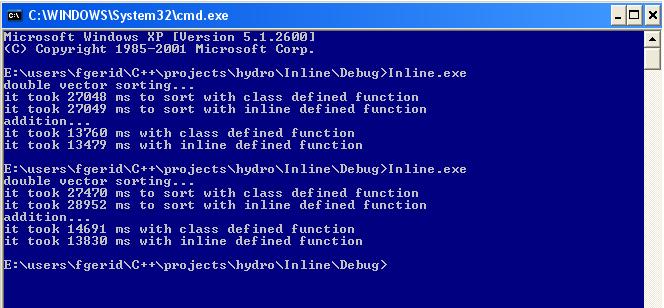
"double" vector sorting with class defined function is faster than inline function defined in header file. See the below test.

Test:
Copy and paste the below codes to your previous test project files to add vector sorting capability.
İf you want, change the name of the class "Add" in "MyMath.h". Since it contains also sort() function now
Do not forget to include "vector" and "algortihm" for dealing with vector and its sort() method.
Here is the additional includes for changed files
#include
"vector"
#include
"algorithm"
//put this code to "MyMath.h" int sort_vector_inline(vector<double>& v){ //defined inline sort(v.begin(),v.end()); return 1; }
int sort_vector_class_def(vector<double>& v);

===============================================

//put this code to "class_def.cpp" int sort_vector_class_def(vector<double>& v){ //defined inline sort(v.begin(),v.end()); return 1; }


===============================================

//All of Main.cpp is given here.(lots of changes). //Filename:Main.cpp
#include "MyMath.h"
#include "stdafx.h"
#include
"vector"
#include
"algorithm"

using namespace std;
void main()
{
DWORD startTime,endTime,difTime;
vector v,v1;
int a=1;
int b=2;
int c;
Add testAdd;

cout<<"double vector sorting..."<<"\n";

//fill vector with random numbers
for(int j=0;j<1e7;j++){
v1.push_back(rand());
}
startTime=GetTickCount();
testAdd.sort_vector_inline(v1);
endTime=GetTickCount();
difTime=endTime-startTime;
cout<< "it took "<
//fill vector again since sorted vector sorting is much more faster

for(int j=0;j<1e7;j++){
v.push_back(rand());
}
startTime=GetTickCount();
testAdd.sort_vector_class_def(v);
endTime=GetTickCount();
difTime=endTime-startTime;
cout<< "it took "<
cout<<"addition..."<<"\n";

//use function defined in other cpp file
startTime=GetTickCount();
for(int i=0;i<1e9;i++){
c=testAdd.add_class_def(a,b);
}
endTime=GetTickCount();
difTime=endTime-startTime;
cout<< "it took "<startTime=GetTickCount();
for(int i=0;i<1e9;i++){ style="color: rgb(0, 0, 0);"> c=testAdd.add_inline(a,b);
}
endTime=GetTickCount();
difTime=endTime-startTime;
cout<< "it took "<}

===============================================


I changed the order of functions in main file to see if there is a difference in speed.
It is same for the addition. Still inline function works faster.
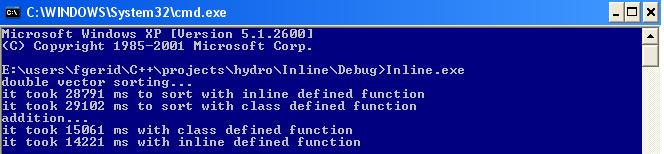
Let's see what happened for vector sorting (below pictures).


if you change the order of function calling sequence, inline function for vector sorting works faster.
So we could not say anything about speeds yet.


Labels: , ,

Inline Function in C++

... .However, another good reason to inline is that you can sometimes speed up your program by inlining the right function. Instead of calling the function every time it is invoked, the compiler will replace the function call with a copy of the function body.
[from the page given in the link. Also read Why not inline everything?]

And here is my project for speed comparison of inline defined function and class defined function in Visual C++:

First: Copy and paste below codes with the correct name into header files in your project.

//Filename:MyMath.h
#include

using namespace std;

class Add{
public:
int add_inline( int a,int b){
return a+b;
}
int add_class_def(int a1,int b1);
};

========================================================

// Filename:stdafx.h
// include file for standard system include files,
// or project specific include files that are used frequently, but
// are changed infrequently
//
// Copyright (c) Microsoft Corporation. All rights reserved.
//
// This source code is only intended as a supplement to the
// Microsoft Classes Reference and related electronic
// documentation provided with the library.
// See these sources for detailed information regarding the
// Microsoft C++ Libraries products.
#pragma once
#define WIN32_LEAN_AND_MEAN // Exclude rarely-used stuff from Windows headers
// turns off ATL's hiding of some common and often safely ignored warning messages
#define _ATL_ALL_WARNINGS
#ifndef _WIN32_WINNT
#define _WIN32_WINNT 0x0403
#endif
// TODO: this disables support for registering COM objects
// exported by this project since the project contains no
// COM objects or typelib. If you wish to export COM objects
// from this project, add a typelib and remove this line

#define _ATL_NO_COM_SUPPORT
#include

Second: Below codes are the cpp files for your project.

//Filename:Main.cpp
#include "MyMath.h"
#include "stdafx.h"
#include

using namespace std;
void main()
{
DWORD startTime,endTime,difTime;

int a=1;
int
b=2;
int c;
Add testAdd;
// use inline function declared and defined in header file MyMath.h
startTime=GetTickCount();
for(int i=0;i<1e9;i++){>
c=testAdd.add_inline(a,b);
}
endTime=GetTickCount();
difTime=endTime-startTime;
cout<< "it took "<<<">
//use function defined in other cpp file
startTime=GetTickCount();
for(int i=0;i<1e9;i++){
c=testAdd.add_class_def(a,b);
}
endTime=GetTickCount();
difTime=endTime-startTime;
cout<< "it took "<<<">
}
========================================================

//File name:class_def.cpp
#include "MyMath.h"
int Add::add_class_def(int a1,int b1){
return a1+b1;
}

========================================================


// Filename: stdafx.cpp
// stdafx.cpp : source file that includes just the standard includes
// PerformanceCounter.pch will be the pre-compiled header
// stdafx.obj will contain the pre-compiled type information
// Copyright (c) Microsoft Corporation. All rights reserved.
//
// This source code is only intended as a supplement to the
// Microsoft Classes Reference and related electronic
// documentation provided with the library.
// See these sources for detailed information regarding the
// Microsoft C++ Libraries products.
#include "stdafx.h"
// TODO: reference any additional headers you need in STDAFX.H
// and not in this file


Results:
*test1


*test2 (In another computer with different configuration)

Labels: , ,